
PlatformLaunch
Start from an application that already works
A prebuilt Cenna application is not a template or a starter kit. It is a complete, versioned product. Interface, agents, workflows, integrations, and permissions. That installs into your cloud account and runs. Your team changes the parts that are specific to your business.
01In the box
What "prebuilt" actually means
Every application in the catalog arrives with the parts that take a platform team a quarter to build. None of it is the part that makes your business different, and that is the only part your developers should be writing.
Authentication
Single sign-on through the identity provider you already run, wired before anyone logs in for the first time.
Access controls
Role-based permissions per application and per workspace, so people reach only the cases and documents they should.
Interface
A working application for the people who do the job, not a chat box bolted onto a database.
Chat
A conversational surface over the same data and the same permissions, for the questions that do not fit a form.
Knowledge base
Your policies, contracts, and runbooks indexed and grounded, so answers come from your documents rather than the model's memory.
Agents
Named agents scoped to real tasks. Intake, review, drafting, each one traceable and priced on its own.
Workflows
The routing, approvals, and escalations the work requires, already wired between the agents.
Integrations
Connections declared with explicit scopes, so an agent can read SharePoint or post to Slack and nothing beyond that.
Audit trail
Every agent run recorded as a trace with its spans and its cost, kept in your account and replayable.
Spend metering
Token and cloud cost attributed by application, task, user, and model from the very first run.
02The catalog
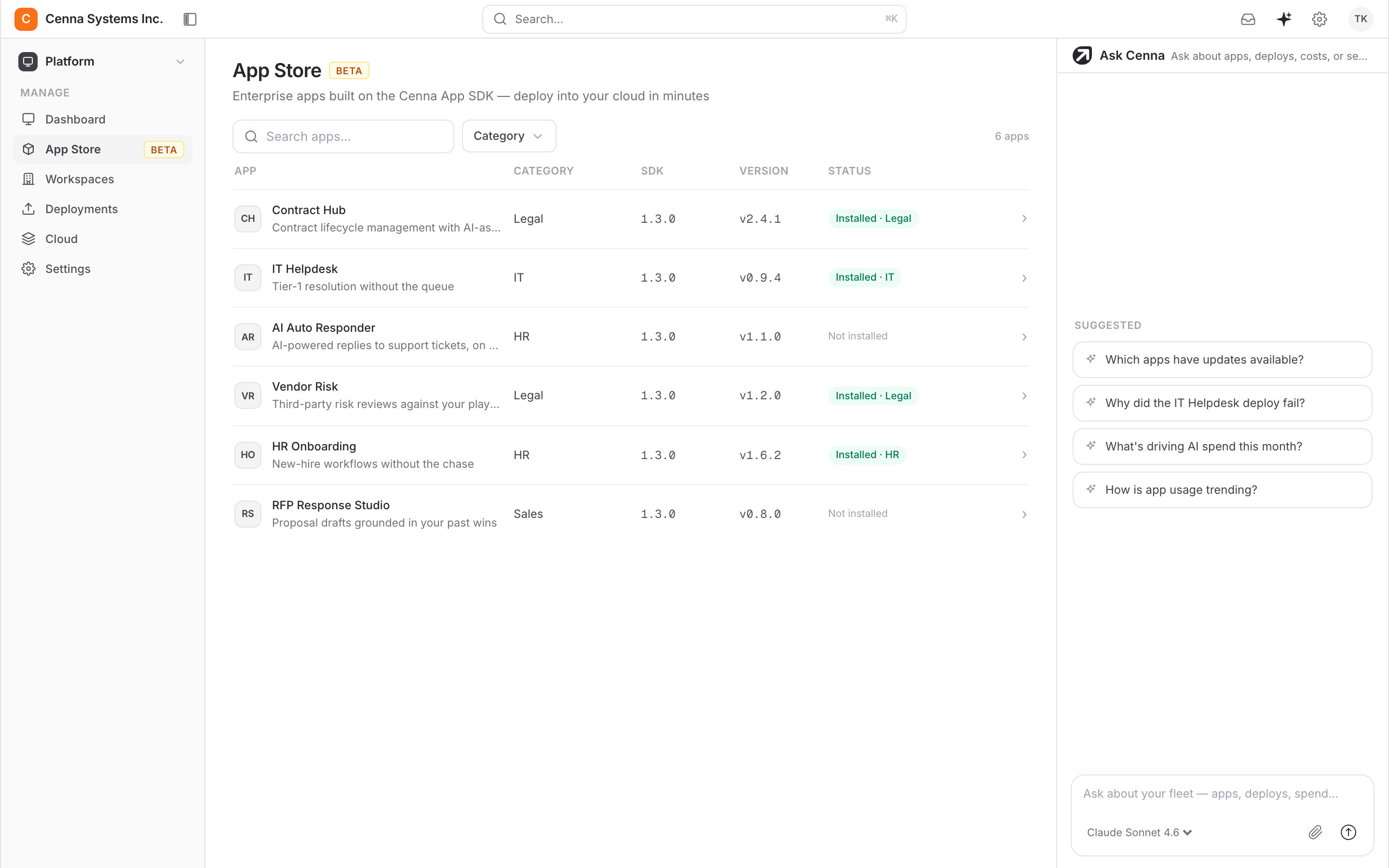
Six applications in the catalog today
Each one is versioned, pinned to an App SDK release, and installs into a workspace you choose. Categories map to the team that owns the work.
- Contract Hub
Contract lifecycle management with AI assistance
- Vendor Risk
Continuous third-party risk assessment
- HR Onboarding
From offer letter to day one, automated
- IT Helpdesk
Everyday tickets, resolved end to end
- RFP Response Studio
First-draft RFP responses in hours, not weeks
- Invoice Auditor
Every invoice checked against its contract
03Customize
The part you actually write
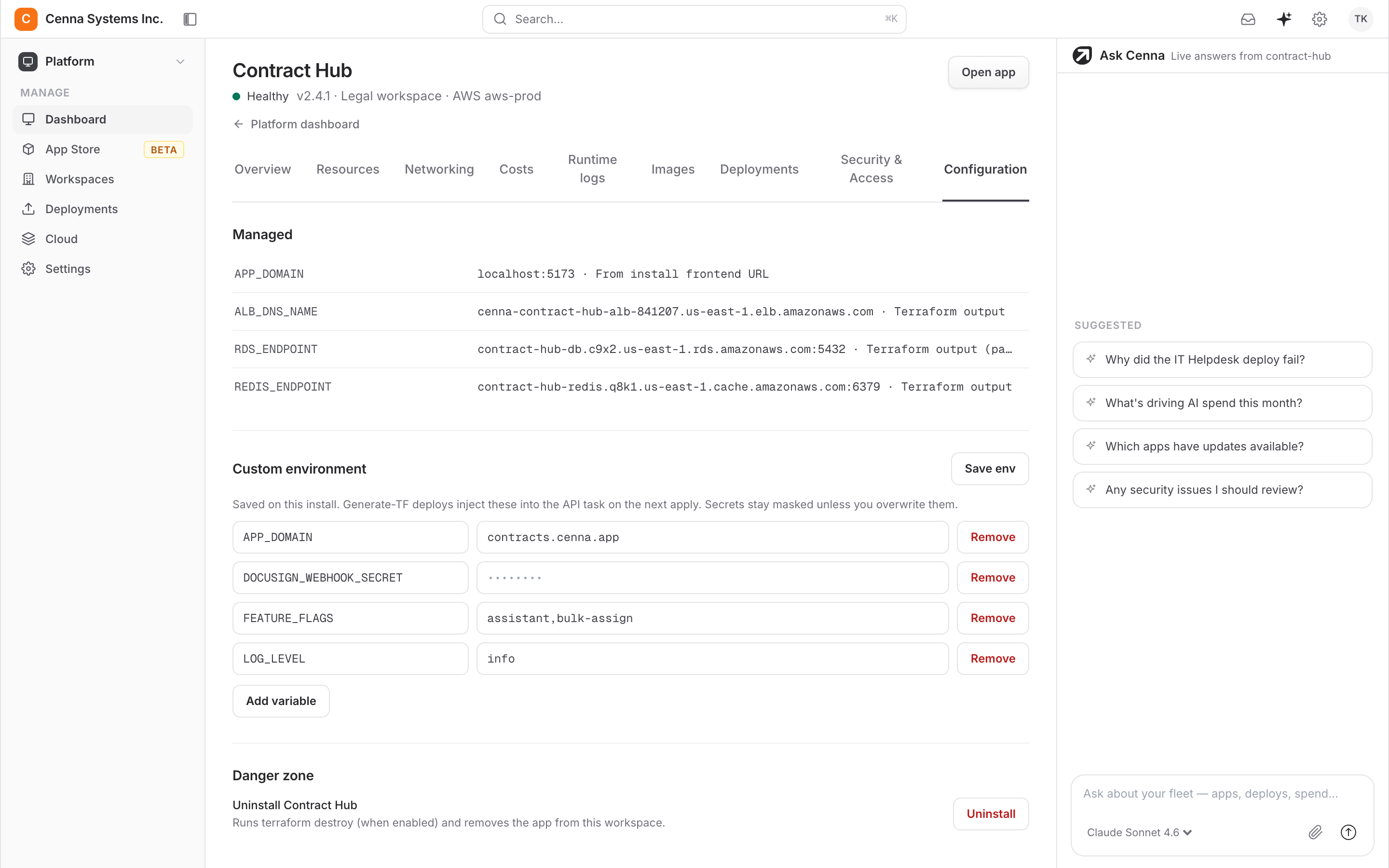
Configuration comes first: domain, sizing, database, model keys, webhook targets, with secrets masked and stored in your own account. Then the source itself, in your repository, in whatever editor your team already uses. There is no proprietary IDE and no visual builder to learn.
Config values · Secrets in your account · Source in your repo
04Releases
Upgrades arrive as releases, not migrations
Every application carries two version numbers: its own, and the App SDK release it is pinned to. When Cenna ships a new version it appears in the store as an available upgrade.
Two version numbers
The application has its own version and pins an App SDK release, so you always know what changed and what it was built against.
Upgrades are opt-in
A new release shows up in the store as available. Nothing moves in your account until your team decides to take it.
You keep the repository
The code is yours throughout. An upgrade moves the platform forward; it is not a hand-back of the application to the vendor.
05FAQ
Questions about starting from a prebuilt application
What if an application does eighty percent of what we need?
That is the case this is built for. The eighty percent is the foundation nobody should be rebuilding. Auth, interface, orchestration, integrations, deployment. Your developers write the remaining twenty percent in your own repository, which is the part that reflects how your business actually works.
Can we start from nothing instead?
Yes. Build directly on the Cenna App SDK, or bring an application you already have and deploy it on Cenna. It gets the same identity, deployment, spend metering, and audit trail as anything from the catalog.
Do we have to take every upgrade?
No. Upgrades surface in the store as available and stay there until you choose to take one. Applications pin an App SDK version, so you can see what a release is built against before moving.
Where does an application install?
Into a workspace you pick, inside your own cloud account and region. Permissions follow your identity provider from that point, and spend for that application is metered separately from day one.
See the catalog against your own use case.
A thirty-minute walkthrough: pick the application closest to the work you have, and we will show what it does out of the box and what your team would change.
Get a DemoBuilt for speed. Engineered for control.